Bio-SnapOn™ Effortless Biometric Software Integration….. Without the SDK
Interface our Award-Winning, Multi-Modal Hybrid Biometric Platform™ Into ANY Third-Party Software to Eliminate ID Cards, Passwords & PINs
Bio-SnapOn™
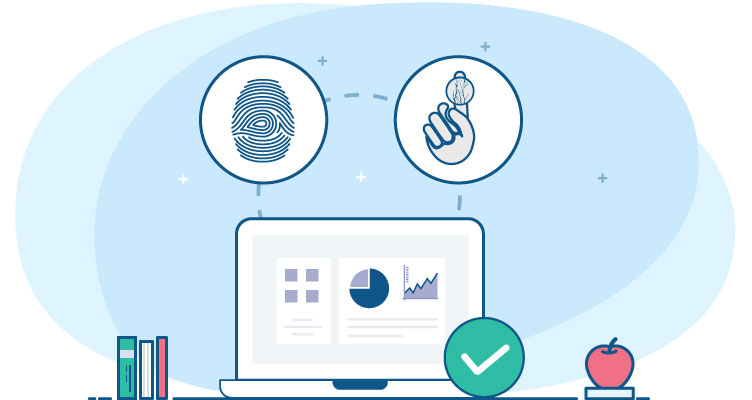
Bio-SnapON™ is a complete biometric software system that can be instantly “snapped-on” to any Windows or web software, without any code-level development. The solution leverages our award-winning Hybrid Biometric Platform™ technology, which supports fingerprint, finger vein biometrics.
One of the most popular uses of Bio-SnapON™ is to add biometric recognition to PC-based time clock software to eliminate the costs associated with “buddy punching.” When Bio-SnapON™ is interfaced with time and attendance software, employees must scan their fingerprint, finger vein to clock in or out.
Our RightPunch™ biometric time clock seamlessly interfaces with many major workforce management platforms, including Kronos, ADP, Empower, Qqest and others.
How It Works
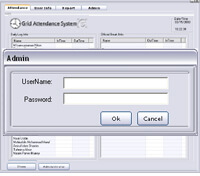
To replace the manual input mechanism with fingerprint identification:
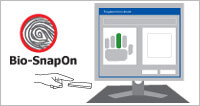
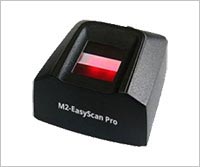
Step2: After the user has been enrolled, he/she simply scans a single fingerprint to be identified.
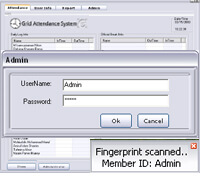
Step3: After a user’s fingerprint is scanned, the Bio-SnapON engine matches the print and sends the associated credential to the host software. The host software then performs the appropriate action, such as clocking the user in or out.
Features
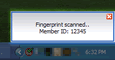
Pop-up notification Window
Administrators have the option of showing a pop-up window above the system tray after each fingerprint scan. If this option is enabled, a message will appear indicating whether or not the user was successfully identified.
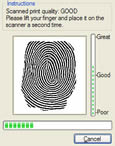
Visual feedback mechanism
When new users are enrolled into the system, a dialog box shows the actual fingerprint image. An image quality scale also provides feedback to ensure that high quality data is being fed into the fingerprint software. The visual feedback mechanism can also be displayed during subsequent fingerprint identification attempts, or it can be kept hidden.
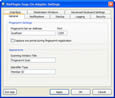
Comprehensive administrative console
Administrators can configure the Bio-SnapON system settings through an intuitive console. Bio-SnapON offers a full-featured set of administrative controls allowing for capabilities such as: LAN/WAN configuration, multi-scan enrollment/identification, choice of three interface protocols, identification log, advanced keyboard settings, appearance customization, and security.
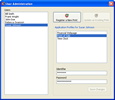
Multi-application communication (SSO Lite)
Unlike competing products, Bio-SnapON allows you to store multiple ID credentials and application configurations under a single fingerprint template and user account. This means that users can enroll different passwords, PINs, etc. under a single fingerprint, but associate them to individual applications.
Industries
| POS: | Control payroll accuracy and transaction overrides by requiring employees to login with a fingerprint scan. |
| Schools: | Interface with lunch line POS, library, and SIS software to create efficiencies , increase revenue, and protect student interests. |
| Workforce management: | More accurately manage employees and save up to 4% of annual gross payroll budgets by eliminating “buddy punching” into PC-based time clock software. |
| Check cashing: | Reduce fraud and protect assets with customer fingerprint authentication within check cashing software. |
| Membership Management: | Member-based establishments (e.g. fitness clubs) can increase profitability, improve convenience, and eliminate problems with lost or stolen ID cards. |
Technical Specifications
| Client requirements | |
| Memory | 256 MB minimum |
| Hard disk | 30 MB minimum |
| CPU | 500 GHz Pentium (or equivalent) minimum |
| Operating system | Windows 98SE, ME, 2000, XP, 2003, Vista, Windows 7, Windows 8, Windows 8.1 |
| Server requirements | |
| Memory | 512 MB minimum |
| Hard disk | 200 MB minimum |
| CPU | 1 GHz Pentium (or equivalent) minimum |
| Operating system | Windows 98SE, ME, 2000, XP, 2003, Vista, Windows 7, Windows 8, Windows 8.1 |
Benefits of Biometrics
BioSnapON™ Sample Use Case – Church Childcare Check-Ins:
- Supports Internet Explorer, Mozilla FireFox, Google Chrome, Safari browsers.
- Identify members at check-in, instantly retrieving their picture and information from the management software.
- Protect the safety of children by accurately identifying guardians.
- Ensure that individuals are not fraudulently accessing church facilities.
- Completely replace ID cards, which eradicates costs incurred due to lost or stolen cards.